Images are the most important component of the blog or the piece of content that you are writing.Without images, the post looks like a tree without leaves.

There is no very much advantage using ful quality image on web.Consider, if you used 1080x540px image,it may load 200x100 or 500x250px on mobile phones.So we are just slowing down our website in unnecessary images.
These text get used for two reasons. First is is anyone using their browser in 'text-only' mode, then he cannot see the images but he can know the place of the image.In that place you might have notice some time, that a text is shown.This text is alt text.In second case, if the image on the server got deleted, it returns with 404 error.Then , in that image a text is is shown and that is alt tell that you input here.
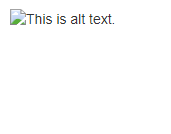
In both the cases, the main purpose is to get the idea of what the image is to the user if he or she is unable to view the image.
What is Alt text?Alt means alternate text.It is a simple and short text for an image that describes the whole image.So, remember to use alt from now on wards, if you weren't.
You can name the image like below.For example-
So that's were the tips about image SEO which can rank images from your bog so high that you can get more traffic through images rather than web search.
Images worth a thousand words.So bloggers always add images to their blog post to make it more enlighten and attractive.This is a very good thing but the most people fails here - in Image SEO.
Image SEO is the most important thing we will discuss today as you can gain lot of traffic right from the 'image' section of any search engine.People are searching for images and now a days Google had removed direct download button, forcing users to go on their sites.So, from here only, we can get the traffic.
So lets have a look at the important things we need to know about Image SEO.

Add the Images from right source
Most of the Bloggers still searching on Google for images and directly add them in their blog posts.This is completely wrong and you may have to go through some legal disputes for that.As the images shown by Google are subjected to copyright, the owner has full right over his images.
 So the question arrives-So from where we should gather the images?Shall we have to make or click our own?
And the answer is yes!You can of course click the images.but someone living on mars cannot click the image of Eiffel tower in Paris as he have to come there.

And the answer is yes!You can of course click the images.but someone living on mars cannot click the image of Eiffel tower in Paris as he have to come there.
That's why we have the stock websites.
Stock websites are the websites which stores the images, vectors, illustrations and video footage which user uploads from the different part around globe.Then anyone can download it by paying some royalty fee.That's how the stock photography works.But everyone can't afford to buy these images from these sites.So we have the free image stock websites.
Free stock image websites like Pixabay, provides free images to users and can be downloaded without paying a single penny.There are many more stock image websites from which you can download the images such as-
Stock websites are the websites which stores the images, vectors, illustrations and video footage which user uploads from the different part around globe.Then anyone can download it by paying some royalty fee.That's how the stock photography works.But everyone can't afford to buy these images from these sites.So we have the free image stock websites.
Free stock image websites like Pixabay, provides free images to users and can be downloaded without paying a single penny.There are many more stock image websites from which you can download the images such as-
It is very safe to use any of the image from the above site.You are free to mention more sites in comment box below of you know any.
The another way to grab images from Google or Bing search engine is that filter it.Filter the images based on their license.
In Google Images, click on 'tools' button.Some options will pan down. Click on 'Usage Rights'.Chose the option labeled with modification or labeled for reuse.
 |
| As shown in the above image, you can use the images labeled for reuse by directly copying from Google. |
In Bing, Go in Images tab, click on 'Filter' button on extreme right.Again, as Google, some options will come down.Select License.Chose any one of the options marked red in below image.

But as experienced, not very good and on to point images are not found.But still you can use this as an method for getting images.
Compress the images
Images takes lot of time to download.Sometimes, more than 70% of page load time is used for getting images.This is all because the size of image is huge as compared to main html or CSS and JavaScript files.
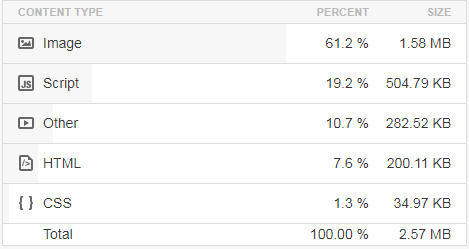

So, you need to compress the images.Compressing images not only saves space, but also makes the page to load fast.
Some of the online image compressors are given below.
These are some tools which will help you to compress down your images.there are many such image compressors online.Some of them supports bulk images compression, while some not.
this is very irritating work of compressing images, then adding.There is no shortcut for it?Yes!There is! If you are using WordPress, then you can use plugin for it.There are many plugins which will compress images for you!
But if you are using Google Blogger, you don't have to worry even a single bit.It is because after uploading image, it directly compress it into small, medium, large and Extra Large.And still you can use original image if you want.
 |
| options available in Google Blogger for different image sizes. |
Using ALT text
Alt tag is one of the most important text.Many bloggers make mistake here.They do not at all use these texts.These text get used for two reasons. First is is anyone using their browser in 'text-only' mode, then he cannot see the images but he can know the place of the image.In that place you might have notice some time, that a text is shown.This text is alt text.In second case, if the image on the server got deleted, it returns with 404 error.Then , in that image a text is is shown and that is alt tell that you input here.

In both the cases, the main purpose is to get the idea of what the image is to the user if he or she is unable to view the image.
What is Alt text?Alt means alternate text.It is a simple and short text for an image that describes the whole image.So, remember to use alt from now on wards, if you weren't.
Use the right keywords while naming the images
The right keywords always do well in Image SEO. So, you need to use the right keywords while naming the image.You can name the image like below.For example-
small-tomato-plan.pngRather than-
smalltomatoplant.pngIf you want to find right keywords, go on NeilPatel's website and do a keyword research.
So that's were the tips about image SEO which can rank images from your bog so high that you can get more traffic through images rather than web search.