Friday, 19 April 2024

Sunday, 11 September 2022

How To Defer offscreen images and Serve images in next-gen formats in Blogger (Blogspot)

How To Defer offscreen images and Serve images in next-gen formats in Blogger (Blogspot)

The most frequent and common problem faced by Blogger Community is that these two Opportunities in the Page Speed Insights -

  • Defer offscreen images
  • Serve images in next-gen formats
What they are trying to say is defer or lay load the images on the web page and use compressed images. Image formats like WebP and AVIF often provide better compression than PNG or JPEG, which means faster downloads and less data consumption.

In this post, I'm going to show you how to tackle this problem.

How to lazy load the Blogger's Comment Box

How to lazy load the Blogger's Comment Box

Welcome Back! After a long time! In this post, I'm going to write about Blogger. I know many people out there use blogger to blog and its not the worst platform as many people frustrated with Blogger will say.

Mainly because blogger loads slow as shown in the Page Speed Insights, it loads many JS and CSS bundles that are hard to remove. In case of WordPress, you have many plugins in hand, you can customize it the way you want.

So today, I'm going to share how you can make your blogspot load time faster. And, how to Lazyload the Blogger Comment Box.

Sunday, 14 August 2022

(Solution) Blogspot Image Not Uploading On Pasting Error

(Solution) Blogspot Image Not Uploading On Pasting Error

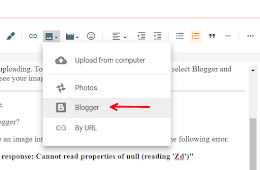
You must have seen the error when we try to copy any image and paste it in blogger's Compose View HTML editor. It gives an weird error on pasting.

But let me tell you, that this error is because of not able to include the image into the HTML, and not because that the image is not uploading.

That means the images are uploading. To add an image, click on add image icon, select Blogger and then scroll down - you will see your image. Click to add that.

Wednesday, 6 October 2021

This Is How blogger.googleusercontent.com Will Affect Your Image SEO

This Is How blogger.googleusercontent.com Will Affect Your Image SEO

So you know last month, the way blogger was hosting images changed. Exactly what changed? Don't know.

I mean different people had different problem and they are talking about it here at the forum.

But the main thing that happened was that Blogger changed it URL where they used to host image i.e. from https://*.bp.blogspot.com to https://blogger.googleusercontent.com.

Wednesday, 21 July 2021

Friday, 25 December 2020

Thursday, 21 May 2020

Thursday, 7 May 2020

How To Change Default Permalink Structure in Blogger

How To Change Default Permalink Structure in Blogger
Hello everyone today I am going to show you a way to remove the default permalink in the Blogger. WordPress already has this feature that Blogger lacks. Seems like Google Blogger is little serious about its security or want to prevent spam or misleading URL structures. What you think about it? Let me know in the comments below!